Reviewing & Merging Duplicates#
Dedupify surfaces candidate pairs for your review based on the confidence score generated by your matching rules. You control whether to merge, skip, or dismiss each pair.

The Duplicates tab — your full review queue across an object type in one place.
Where the Review Queue Appears#
Your review queue is accessible in two places that share the same experience:
- The Dedupify settings page — the Duplicates tab shows all open candidates across an object type in one place, ideal for bulk review sessions.
- Individual CRM records — the Duplicates card on any contact, company, deal, or ticket record shows candidates specific to that record. Useful when you spot a potential duplicate while working in your CRM.

The Duplicates card on a CRM record.
Both surfaces let you view, merge, and dismiss pairs without navigating away from where you are working.
Side-by-Side Comparison#
Clicking into any candidate pair opens a side-by-side view showing both records. The fields displayed come from your Object Settings → Duplicate Review Property Display configuration — see Object Settings for how to customize which fields appear and in what order.
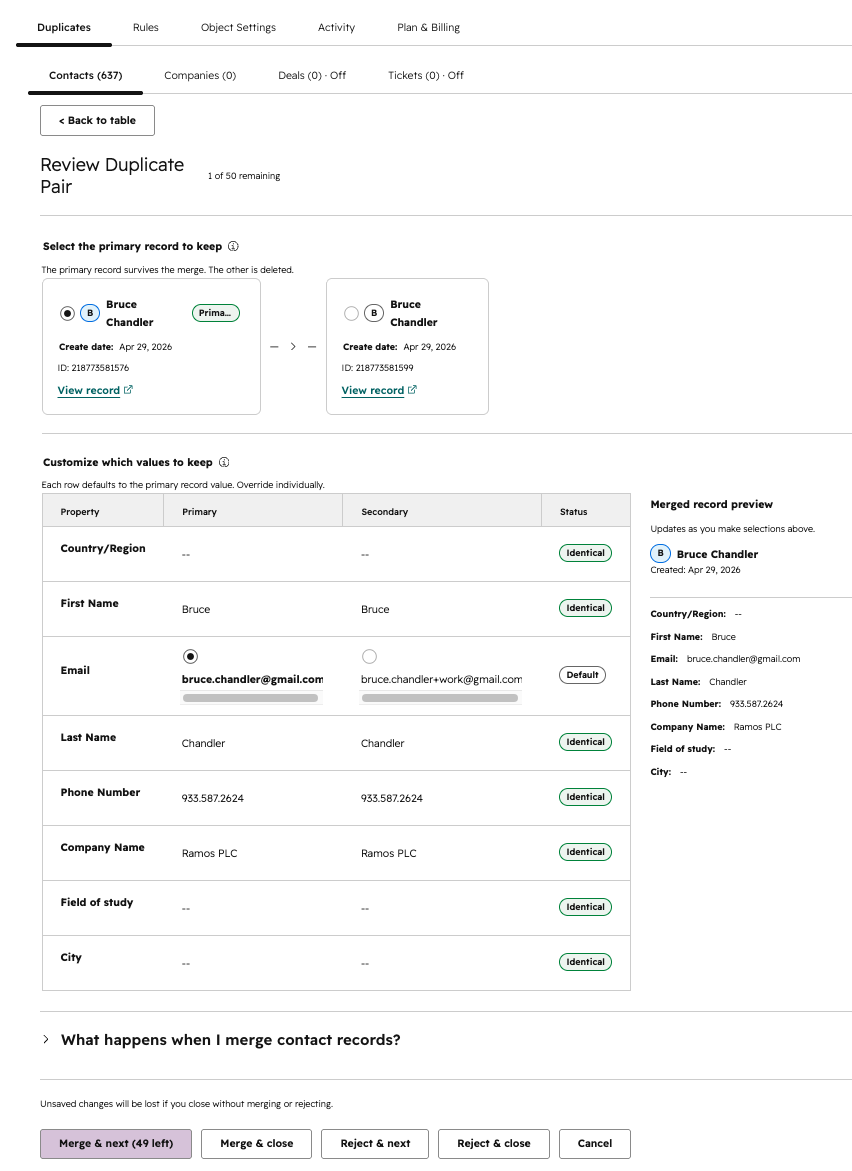
Review a duplicate pair: pick the primary record to keep, then choose which value survives for each property.
Default fields by object type:
- Contacts: first name, last name, email, phone, company
- Companies: name, domain, phone, city, industry
- Deals: deal name, amount, pipeline, deal stage
- Tickets: subject, content, pipeline, status
The comparison highlights differences between the two records so you can quickly identify which one is more complete or more recent.
Manual Merge#
When you are ready to merge, the review view shows you the proposed survivor — the record that will be kept — based on your survivorship settings. One click executes the merge.
Merges use HubSpot’s native merge, so the full record timeline is preserved on the surviving record. The losing record is moved to HubSpot’s recycle bin and can be restored within 90 days if needed. For more detail, see Activity & Audit.
One HubSpot platform difference to know: for custom objects, HubSpot’s merge creates a new record (with a new record ID) that combines both originals — links to either original ID redirect to it automatically, and the new record’s “Merged record IDs” property lists both. Standard objects (Contacts, Companies, Deals, Tickets) keep the primary record’s ID. Dedupify’s activity log records the kept record either way.
Merges are not trivially reversible, so review the proposed outcome before confirming.
Dismissing a Pair#
If two records look similar but are genuinely different people or companies, you can dismiss the pair. Dismissed pairs will not resurface in your review queue unless one of the records changes in a way that Dedupify re-evaluates.
Auto-Merge#
If you prefer to skip manual review for very high-confidence pairs, you can enable auto-merge on a per-rule basis. Auto-merge resolves pairs above a separate, higher threshold without requiring any action from you. See Review Thresholds & Auto-Merge for setup and safeguards.